For cord-cutters in particular, optimizing internet performance is essential because streaming now replaces traditional cable as the primary entertainment source.
Few things ruin streaming faster than constant buffering, blurry video, or sudden connection drops during a movie or live event. While many people assume they need faster internet, the reality is often more complicated. To improve streaming quality on slow internet, look beyond speed alone and consider Wi-Fi strength, device performance, network congestion, and how many people are using the connection simultaneously.
The good news is that many streaming problems can be improved without immediately upgrading to a more expensive internet plan. Small adjustments to your setup often create surprisingly large improvements in video stability and streaming quality.
Check Your Actual Internet Speeds First
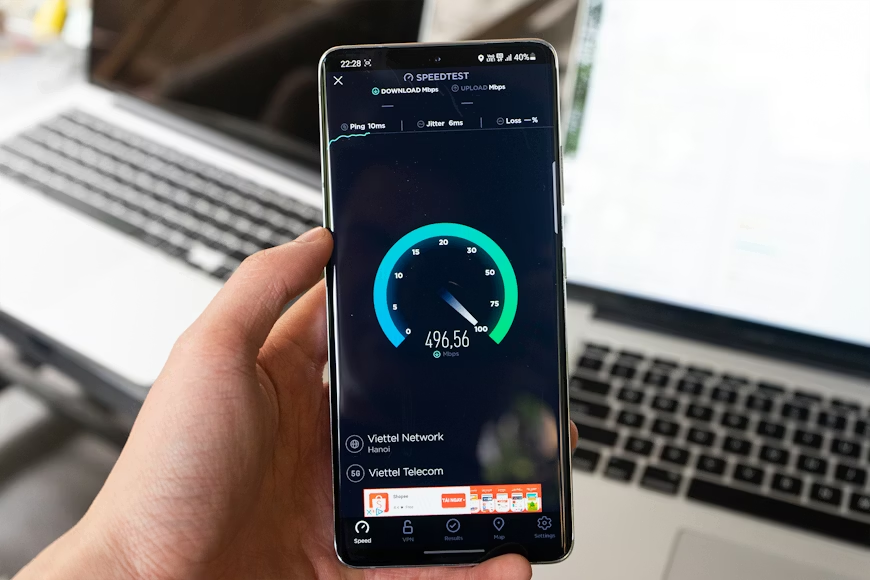
Before making changes, it helps to understand what speeds your household is actually receiving.
Many streaming issues blamed on “slow internet” are actually caused by unstable Wi-Fi or overloaded home networks rather than insufficient broadband plans themselves.
Running a speed test on multiple devices can reveal whether the connection performs consistently throughout the home. Pay attention not only to download speed but also to stability and to how speeds change depending on the room’s location.
For most households, standard HD streaming does not require extremely high speeds. However, 4K streaming, multiple simultaneous streams, gaming, and video calls can significantly increase bandwidth demand.
Understanding the real problem helps avoid unnecessary internet upgrades that may not solve the issue anyway.
See The Best Internet Speeds for Streaming Without Interruptions before upgrading your plan.
Improve Wi-Fi Placement
One of the most overlooked streaming fixes is router placement.
Many people hide routers behind furniture, inside cabinets, or in corners of the house where the signal struggles to spread effectively. This weakens Wi-Fi performance and results in inconsistent streaming quality, especially farther from the router.
Ideally, the router should sit in a central, elevated location with minimal physical obstructions nearby.
Even small adjustments can dramatically improve streaming reliability.
Apartment buildings may also experience interference from neighboring networks. Changing Wi-Fi channels or moving the router slightly away from other electronics sometimes helps reduce congestion and improve stability.
Explore The Best Streaming Setups for Small Apartments and Limited Space for tighter layouts.
Use Ethernet When Possible
Wi-Fi is convenient, but wired Ethernet connections remain far more stable for streaming.
If your television or streaming device sits close enough to the router, using an Ethernet cable often eliminates buffering problems almost immediately. Wired connections reduce interference, stabilize speeds, and improve streaming consistency during high-demand periods.
This becomes especially important for 4K streaming, live sports, and households with multiple active devices.
Many streaming devices, smart TVs, and gaming consoles support Ethernet directly or through adapters.
For viewers experiencing persistent buffering despite strong internet plans, wired connections often solve the problem more effectively than simply paying for faster speeds.
Reduce Network Congestion During Streaming
Internet bandwidth is shared across all connected devices in the household.
If multiple people are gaming, downloading files, attending video calls, or streaming simultaneously, the network can become congested quickly. This often causes video quality drops or buffering during peak usage periods.
Some routers allow users to prioritize streaming devices using Quality of Service (QoS) settings. This helps ensure streaming traffic receives higher priority during busy periods.
Closing unused apps and disconnecting inactive devices can also improve performance surprisingly often.
In many homes, the issue is not weak internet service itself. There are too many devices competing for bandwidth simultaneously.
Lower Streaming Resolution Strategically
Many streaming platforms automatically increase video quality whenever bandwidth allows, but this can create instability on slower connections.
Manually lowering the streaming resolution from 4K to HD, or from HD to standard definition, often significantly stabilizes playback while still maintaining acceptable image quality.
On smaller televisions or mobile devices, the visual difference between resolutions may barely matter compared to the frustration of constant buffering.
This becomes especially useful during live sports or peak internet traffic hours when network congestion increases.
A stable HD stream almost always feels better than an unstable 4K stream that buffers repeatedly.
Compare Streaming in 4K vs HD: Is the Upgrade Worth It? before choosing resolution.
Upgrade Older Streaming Devices
Sometimes the streaming device itself causes the problem.
Older smart TVs and outdated streaming hardware may struggle with newer apps, modern codecs, or demanding video formats, even when internet speeds are technically sufficient.
Dedicated streaming devices like Roku, Fire TV Stick, Chromecast, or Apple TV often provide smoother performance than aging smart TV software.
In many cases, replacing an outdated streaming device improves responsiveness and buffering issues far more than upgrading the internet service.
This is especially true for televisions more than a few years old.
Read Apple TV 4K vs Google Chromecast with Google TV before replacing hardware.
Mesh Wi-Fi Can Help Larger Homes
For larger homes or awkward layouts, mesh Wi-Fi systems can dramatically improve streaming consistency.
Unlike traditional routers that weaken farther away, mesh systems spread Wi-Fi coverage more evenly throughout the house using multiple nodes.
This helps eliminate dead zones, weak-signal areas, and inconsistent streaming rooms.
While mesh systems cost more upfront, they often solve long-term streaming frustrations much more effectively than repeatedly upgrading broadband speed alone.
Strong coverage matters as much as raw speed for reliable streaming.
Better Streaming Often Comes From Smarter Setup
Many households immediately assume buffering means they need the fastest internet package available. In reality, streaming quality usually improves most through better network organization, stronger Wi-Fi placement, and smarter device management.
Cord-cutting works best when streaming feels reliable and frustration-free.
By optimizing routers, reducing congestion, upgrading outdated hardware, and using wired connections when possible, most households can dramatically improve streaming quality without dramatically increasing monthly internet costs.